Monday, 28 October 2013

Installing Linux on Acer XC600

I was recently given an Acer XC600 machine with the instructions "Install a Linux system on this machine, I hate windows 8 and have already deleted it."

Whenever I'm given a challenge like that I am always quite happy to introduce somebody to Linux, but I didn't quite realise what a challenge it would be.

The main problem is that a lot of new computers are being sold with secure boot and it is enabled by default.  The official line from microsoft is that it is to stop any malware loading up at the time of boot and make your system more secure.  However after wrestling with this system for more than a week, I am not convinced.

There is a specific order which you must switch secure boot off otherwise it will not work, the annoying part is that it will let you boot up the liveCD and install the system, but upon restart the system will never load, giving a device error message.

Here are the steps, I seriously hope that this helps and avoids the huge amount of time I wasted on this relatively simple task.

1. Upon switching the computer on hit the delete key, this will take you into the bios

2. Go to security and change secure boot to "Disabled"

3. On the boot option, make sure CSM is "Enabled"

4. In advanced, go to "integrated peripherals" and change the SATA option to IDE (regardless of the actual hardware in the machine)

5. Save and exit bios

You will now be able to install a Linux distro from a CD, DVD or pen drive as before on the Acer XC600.

image realeased under creative commons and taken from http://farm5.staticflickr.com/4035/4254099567_2ac8108be3_z.jpg
Free your PC to install Linux


Tuesday, 2 July 2013

Updated: MP3 files in Debian

A lot of new users move from Ubuntu to another Debian based distro to limit the ammount of change they experience. But often can be a bit daunted by the challenges that Ubuntu made easy for them. One such is music files in MP3 format.

Whilst I personally use Ogg Vorbis and would encourage all others to, I am realistic that a lot of people still want to use their MP3 files and even build up their collection.

*If you are unsure what the term "as root" means then simply add sudo before each command that requires root privileges, you will be required to enter your password as sudo is a powerful tool*

Playing MP3 files

For playing MP3 files, the quickest method is to download VLC player. This is available from the software repositories from the majority of distros. This can be installed very easily:

1. Open the terminal

2. As root type: apt-get install vlc

This now gives you a player.

Ripping CDs to MP3 format

Should you want to rip your CDs to MP3 format then we still have another few steps to take.

1. Open the terminal

2. As root type: apt-get install sound-juicer

This gives a program that will rip the music from a CD and save it onto the computer. We can load it up from the main menu (usually listed under the multimedia or sound and video), called Audio CD Extractor.
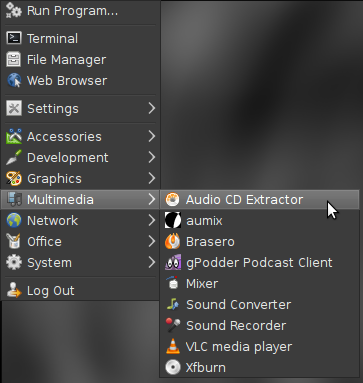


If we open this up and click on edit and preferences we should be greeted by a window as shown below:
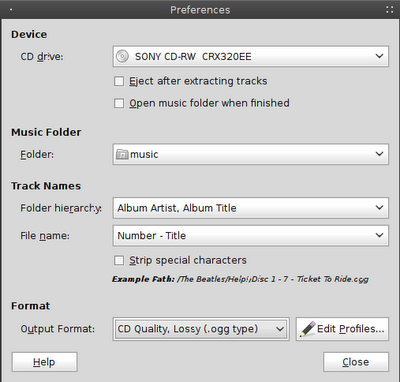


Down near the bottom of the window we should see Output Format, this by default is set to CD Qua;ity, Lossy (.ogg type). At this point if we click on this it will not give us the option of MP3. We still have a few more things to do.

The package we need is not available in the Debian repos due to Debian's commitment to free software. But we can add this. We need to go back to our terminal.

3. As root type: nano /etc/apt/sources.list (if you are met with the message unknown command nano, then you can retype the command replacing nano with gedit)

4. Decide what repos you would like to add:

Stable: deb ftp://ftp.deb-multimedia.org stable main non-free
Testing: deb ftp://ftp.deb-multimedia.org testing main non-free
Unstable: deb ftp://ftp.deb-multimedia.org sid main non-free

Add only one of the above choices, just type the part in bold to the end of document.

5. Exit the file by pressing Ctrl + X, it will then ask you if you wish to save press y and then hit return twice.

This will add the repos to our system, but we also need to have the keyring before the repos will work.

6. Download the Debian Multimedia keyring, as of Debian Wheezy (the current stable version) it is in the repos.  As root, type: apt-get update

7. Navigate to the directory and, as root, type: apt-get install debian-multimedia-keyring

8. as root, type: apt-get update

9. as root, type: apt-get install gstreamer0.10-lame gstreamer0.10-plugins-ugly

That's it.

To check it has worked open up Audio CD Extractor again, click on edit and preferences. This time when we click on Output Format, MP3 should be an option.

Enjoy your music.


Saturday, 29 June 2013

Cassette Tapes: given a new life

In recent times vinyls (or records as I referred to them in my younger age) have shown signs of resurgence, CDs are still readily available and the digital format is quickly becoming the standard choice for many people's music. However there appears that there is a forgotten player in the music world: the cassette tape.

For the decade of the 80s, the cassette was the main format that the majority of consumers used to listen to their favourite bands, but with the 90s came the CD and by 1995 cassettes were scarcely seen on the majority of supermarket shelves, although they could still be found in dedicated music shops until 2000, but by then they were clearly old news.

Although I Luke music in general, mainstream artists that are constantly played on the radio, TV and appear regularly in the charts do not appeal to me. Rather I like to discover unknown artists through browsing sites such as Jamendo and Bandcamp. I was extremely happy to see recently that indie artists are starting to sell their music in cassette form, albeit in very limited numbers (usually 100 copies). But instead of simply flogging a dead horse, these indie artists are offering the tracks in digital format along with the physical cassette. If the purchase is made through Bandcamp then buyer is offered an immediate download, however with some of the other music sites the cassette includes a download code printed on a card that comes in the tape cover.


Whilst many people may see this as pointless and simply a way of hanging onto the past, the sale of cassettes does offer some advantages for the indie artist. Firstly the limited number means that the artist/band isn't investing a huge sum of money. Secondly an artist selling the cassette stands out from the crowd, it offers the consumer a trip down memory lane as well as also giving them the digital form to sync to their media players. Thirdly tapes aren't likely going to be copied. I'm not saying its impossible, all you need is a USB cassette deck, but the process is slow and the quality is considerably poorer than the files produced by a CD rip or the audio files offered by the majority of music sites. Most people don't have twin deck cassette players any more and blank cassette tapes aren't as readily available as they once were.

So when you look at this from this aspect it, then cassettes may be around, in limited numbers, for a while yet. They're not going to be flooding the market, but there's still some life in them yet.

Monday, 15 April 2013

CCJam - Community podcast

It is with a sense of eager anticipation that I announce the news of a new community podcast: CCJam.

CCJam has been released as part of the Unseenstudio Podcast Network, but it is quite different to the other podcasts on the network in that it is non-techy, this is a music podcast.

The aim of CCJam is to promote independent artists/bands, but the major difference with this project is that it is to be community run, this is not simply another podcast featuring Kevie.  Each episode is made up of two music tracks with the talk being submitted by individual show hosts.  The talk doesn't have to be too lengthy, just introduce yourself and the band, then where the listeners can go to listen to more tracks or to find out some further information.  Your welcome to talk about anything else in the show, it's up to you.

In order to make this as easy as possible for everybody, I have broken it down into three steps:

1.  Find a band that you wish to promote.*

2. Record your talk about the artist (no need for anything fancy, this may even be on your smartphone)

3. Email me (ccjam at unseenstudio dot co dot uk) the file along with the links for the tracks

That's it!!! I'll do the rest. The show will be released on the Unseenstudio website and it will be added to the subscribers feed automatically.  In order to make the show accessible to as wide a range as possible it is available in both Ogg and MP3 format.

*If the band releases their music under a copyright license then please have a band member email me with permission that CCJam is allowed to play their music.

Friday, 22 March 2013

IRC: problems authenticating your nickname

I have been using IRC now for a number of years and encountered a problem recently that I had not come across before. If your on IRC channels (eg Freenode) frequently then it is a good idea to register your nickname, this ensures that nobody else uses it or tries to claim to be you. This can be done in 4 simple steps:
  1. /msg nickserv register {your password} {your email} 
  2. /msg nickserv set hidemail on 
  3. Check your email and follow instructions 
  4. /msg nickserv identify {your password} 
For step 4 you will probably find a way to set this up automatically if you use an IRC client.

Recently I noticed that I was unable to log on using my registered nickname and found myself being logged in with an alternative.  I was continually greeted with the message "nickname temporarily unavailable" 

Should you be given the same message then there is an easy workaround:

  1. Log onto IRC using your preferred client
  2. /msg nickserv register {your nickname} {your password}
  3. /quote nickserv set enforce OFF 
  4. /quote nickserv release {your nickname} {your password}

After completing these 4 steps, quit your IRC client and then re-start and you should have your old IRC nickname back.  Happy chatting.

The Humble Weekly Sale

The Humble Bundle has been on the go for a while now, offering a selection of games on a "pay what you want" basis, which is available for a limited period only.  Not only are these games cross platform, DRM free but also part of every donation goes to help a charity.

They have now just launched the first of the Humble Weekly Sales, and what a title to begin with: Bastion an RPG-action game.  If you would like to find out more about the game then watch the promotional video below or go to the Humble Weekly Sale website.


The plan is that a new game will be launched every Tuesday with added incentives for those who are willing to donate more of their hard earned cash.

This shows that the market for indie gaming is alive and well in a very difficult economic time.

Monday, 17 December 2012

THQ looking into Linux ports


I’ve previously mentioned The Humble Indie Bundle before on this blog.  A collection of cross platform, independent games are made available for a brief period and a part of the money goes to charity.  Recently, to my horror, they released the Humble THQ Bundle.  THQ are far from being an independent developer, releasing games on PS3, xbox 360 and PC, probably their most notable recent products has been the sandbox game series Saints Row.

I thought that this was the owners of the Humble Bundle falling away from their independent roots and starting to chase after more money from the bigger companies, especially given that this bundle was advertised as “Windows only” and the majority of the games that I checked out on the Wine website listed their performance as “Garbage” so this meant that the deal was truly aimed at the windows user.

However, following some recent news by THQ I have a renewed sense of optimism.  The company were pleased with the sales over the limited period, but even better were the number of requests on their forum and Twitter to offer a Linux port in keeping with the tradition of the Humble Indie Bundle.

In a recent interview with Polygon, THQ president Jason Rubin stated "The message I took away from a large number of tweets and comments around the THQ Humble Bundle sale is that there are vibrant communities of gamers using other operating systems besides the dominant ones, and a company like THQ should not overlook them," 

"Complicating the analysis (in a positive way), gamers have tweeted inventive ideas to me, such as letting the community help in the porting to bring down costs," Rubin said. "THQ is committed to look at anything that makes sense."

"I'm sure we will have more to announced shortly," Rubin added.

We shall look forward to hearing the announcement, whilst this will not get much praise from the freedom lovers, a lot of Linux users still keep a Windows partition purely for gaming purposes.  This is certainly a step in the right direction for gamers on Linux.