The concept is nothing new, indeed Desura has had a native Linux application for a while now, however the games available for Linux compared to number for windows leaves users with a bad taste in their mouths. However steam does offer a range of big name titles that Linux users have sadly been lacking. That’s not to say that all of the games on Steam will be ported to Linux immediately, but as the early ports are Portal, Team Fortress 2, Serious Sam 3 BFE and Left 4 Dead 2 then this is enough to gain significant interest from the Linux gaming community.
Wednesday, 31 October 2012
Valve looking for Linux testers
Valve are requiring the help of Linux users for the upcoming
beta of Steam. Valve are looking for
1000 testers to help out with their first Linux port of their extremely popular
gaming client software. Steam makes purchasing
boxed games off the shelf a thing of the past and allows users to purchase/try
games online and download them instantly.
One of the major advantages to this system is that games are updated
regularly and there is no waiting period as delivery is simply as long as it
takes for the users download to reach their computer.
The concept is nothing new, indeed Desura has had a native Linux application for a while now, however the games available for Linux compared to number for windows leaves users with a bad taste in their mouths. However steam does offer a range of big name titles that Linux users have sadly been lacking. That’s not to say that all of the games on Steam will be ported to Linux immediately, but as the early ports are Portal, Team Fortress 2, Serious Sam 3 BFE and Left 4 Dead 2 then this is enough to gain significant interest from the Linux gaming community.
If you would like to try and gain a place on Valve’s testing
team then all you need to do is create an account at https://steamcommunity.com (if you don’t
already have one) and fill out an online survey here
The concept is nothing new, indeed Desura has had a native Linux application for a while now, however the games available for Linux compared to number for windows leaves users with a bad taste in their mouths. However steam does offer a range of big name titles that Linux users have sadly been lacking. That’s not to say that all of the games on Steam will be ported to Linux immediately, but as the early ports are Portal, Team Fortress 2, Serious Sam 3 BFE and Left 4 Dead 2 then this is enough to gain significant interest from the Linux gaming community.
Sunday, 14 October 2012
The Humble Bundle continues to expand
The Humble Bundle started back on the 4th of May 2010 and ran for seven days. It offered five computer games from independent developers and was offered in a 'pay what you want' format. These were also available in cross platform formats, which gained notable excitement in the Linux world due to a lack of available games compared to the selection on offer to windows and mac users. After the week was over and the money counted the bundle had made $1 million (US). But this wasn't a venture that was fuelled by corporate greed, instead the proceeds were split between charities, game developers and the organisers (in the form of a 'Humble Tip').
Since then there has been several gaming bundles (including some focused on the Android platform) and on the 26th of July 2012 the first music bundle was launched, whilst not considered as big a success as the gaming bundles it still made over $400,000 during the period of sale.
Now as the organisers continue to expand their potential audience the first Humble eBook Bundle was launched on the 9th October 2012, this bundle is available until the 22nd of October. The list of ebooks on offer are: Pirate Cinema (Cory Doctorow), Pump Six and Other Stories (Paolo Bacigalupi), Zoo City (Lauren Beukes), Invasion (Mercedes Lackey), Strange Things Happen and Magic for beginners (both by Kelly Link).
A recent 'reward' feature has been included to the bundles, which gives extra to those who pay above the average price. This bundle is no different and those who donate that little bit extra will also receive Old Man's War (John Scalzi) and Signal to Noise (Neil Gaiman and Dave McKean).
Whether the ebook bundle will become a regular feature or simply a one time venture remains to be seen. However it is good to see the organisers of the Humble Bundle are continuing to try new things and keep the franchise fresh.
Have you got any ideas for a future bundle? Drop them a line here.
The Humble Bundle started back on the 4th of May 2010 and ran for seven days. It offered five computer games from independent developers and was offered in a 'pay what you want' format. These were also available in cross platform formats, which gained notable excitement in the Linux world due to a lack of available games compared to the selection on offer to windows and mac users. After the week was over and the money counted the bundle had made $1 million (US). But this wasn't a venture that was fuelled by corporate greed, instead the proceeds were split between charities, game developers and the organisers (in the form of a 'Humble Tip').
Since then there has been several gaming bundles (including some focused on the Android platform) and on the 26th of July 2012 the first music bundle was launched, whilst not considered as big a success as the gaming bundles it still made over $400,000 during the period of sale.
Now as the organisers continue to expand their potential audience the first Humble eBook Bundle was launched on the 9th October 2012, this bundle is available until the 22nd of October. The list of ebooks on offer are: Pirate Cinema (Cory Doctorow), Pump Six and Other Stories (Paolo Bacigalupi), Zoo City (Lauren Beukes), Invasion (Mercedes Lackey), Strange Things Happen and Magic for beginners (both by Kelly Link).
A recent 'reward' feature has been included to the bundles, which gives extra to those who pay above the average price. This bundle is no different and those who donate that little bit extra will also receive Old Man's War (John Scalzi) and Signal to Noise (Neil Gaiman and Dave McKean).
Whether the ebook bundle will become a regular feature or simply a one time venture remains to be seen. However it is good to see the organisers of the Humble Bundle are continuing to try new things and keep the franchise fresh.
Have you got any ideas for a future bundle? Drop them a line here.
The Humble Bundle continues to expand
Labels:
drm free,
ebooks,
independent
Thursday, 2 August 2012
Firefox OS screenshots
Preview screenshots have been released of Firefox OS, Mozilla's mobile phone operating systems (originally labelled Boot to Gecko).


Although a lot of progress has been made since the last batch of leaked shots, Firefox OS is still in early stages. From these pictures it is clear that the developers were heavily influenced by Google's Android mobile OS. All of the screenshots show standard phone tasks in operation, at this point there is nothing that stands out.
Mozilla have previously stated that they were aiming at the lower end of the market: cheaper phones with less power than their rivals. However with an ever expanding range of Android phones available costing less than £100, Firefox OS will need to offer something to entice users to switch.
Gaining support from the phone carriers is always going to be a major obstacle for any new mobile OS producer, however Mozilla have stated that Deutsche Telekom, Etisalat, Smart, Sprint, Telecom Italia, Telefonica and Telenor will support Firefox OS. Device manufacturers TCL Communication Technology (under the Alcatel One Touch brand) and ZTE have also announced their intentions to manufacture the first devices to feature Mozilla's new smartphone OS.
It's early days yet, but the initial signs for Firefox OS look promising, but not mind blowing.
Preview screenshots have been released of Firefox OS, Mozilla's mobile phone operating systems (originally labelled Boot to Gecko).


Although a lot of progress has been made since the last batch of leaked shots, Firefox OS is still in early stages. From these pictures it is clear that the developers were heavily influenced by Google's Android mobile OS. All of the screenshots show standard phone tasks in operation, at this point there is nothing that stands out.
Mozilla have previously stated that they were aiming at the lower end of the market: cheaper phones with less power than their rivals. However with an ever expanding range of Android phones available costing less than £100, Firefox OS will need to offer something to entice users to switch.
Gaining support from the phone carriers is always going to be a major obstacle for any new mobile OS producer, however Mozilla have stated that Deutsche Telekom, Etisalat, Smart, Sprint, Telecom Italia, Telefonica and Telenor will support Firefox OS. Device manufacturers TCL Communication Technology (under the Alcatel One Touch brand) and ZTE have also announced their intentions to manufacture the first devices to feature Mozilla's new smartphone OS.
It's early days yet, but the initial signs for Firefox OS look promising, but not mind blowing.
Firefox OS screenshots
Labels:
android,
boot to gecko,
HTML5,
Mozilla,
smartphone
Wednesday, 1 August 2012
Jamendo - download Ogg files directly (Updated)
*****Due to Jamendo restructuring it's file archives, this method no longer works in order to obtain albums in ogg vorbis format, I will post an update when I find an alternative method******
Jamendo has all of the songs on it's site available in Ogg Vorbis format, however back on the old site this was only offered as a torrent option and the severe lack of any seeders left many users (including this one) very frustrated. Given that the files are there, the lack of an obvious way to download them is very frustrating. But there is a way to directly download the albums in Ogg Vorbis format to your PC.
It is not as simple as a one click, however it is not overly complicated.
1. First go to the page of the album you wish to download (this will not work from the artist or song pages), in my example I'm using the Roads and Lakes by Crazy Evolution.
2. Take a look at the address bar, this will have the album's ID, in this case it is a77507. Take a note of the numbers only. For this album: 77507
3. Place this into the address bar of your browser:
http://www.jamendo.com/get/album/id/album/archiverestricted/redirect/{album ID numbers go here}/?are=ogg3
so for my example to get the Crazy Evolution album it would be :
http://www.jamendo.com/get/album/id/album/archiverestricted/redirect/77507/?are=ogg3
4. From the pop up window select Save File and then click OK

Once your downloads have finished; sit back, relax and enjoy your music in a free format.
Jamendo has all of the songs on it's site available in Ogg Vorbis format, however back on the old site this was only offered as a torrent option and the severe lack of any seeders left many users (including this one) very frustrated. Given that the files are there, the lack of an obvious way to download them is very frustrating. But there is a way to directly download the albums in Ogg Vorbis format to your PC.
It is not as simple as a one click, however it is not overly complicated.
1. First go to the page of the album you wish to download (this will not work from the artist or song pages), in my example I'm using the Roads and Lakes by Crazy Evolution.
2. Take a look at the address bar, this will have the album's ID, in this case it is a77507. Take a note of the numbers only. For this album: 77507
3. Place this into the address bar of your browser:
http://www.jamendo.com/get/album/id/album/archiverestricted/redirect/{album ID numbers go here}/?are=ogg3
so for my example to get the Crazy Evolution album it would be :
http://www.jamendo.com/get/album/id/album/archiverestricted/redirect/77507/?are=ogg3
4. From the pop up window select Save File and then click OK

Once your downloads have finished; sit back, relax and enjoy your music in a free format.
*****Due to Jamendo restructuring it's file archives, this method no longer works in order to obtain albums in ogg vorbis format, I will post an update when I find an alternative method******
Jamendo has all of the songs on it's site available in Ogg Vorbis format, however back on the old site this was only offered as a torrent option and the severe lack of any seeders left many users (including this one) very frustrated. Given that the files are there, the lack of an obvious way to download them is very frustrating. But there is a way to directly download the albums in Ogg Vorbis format to your PC.
It is not as simple as a one click, however it is not overly complicated.
1. First go to the page of the album you wish to download (this will not work from the artist or song pages), in my example I'm using the Roads and Lakes by Crazy Evolution.
2. Take a look at the address bar, this will have the album's ID, in this case it is a77507. Take a note of the numbers only. For this album: 77507
3. Place this into the address bar of your browser:
http://www.jamendo.com/get/album/id/album/archiverestricted/redirect/{album ID numbers go here}/?are=ogg3
so for my example to get the Crazy Evolution album it would be :
http://www.jamendo.com/get/album/id/album/archiverestricted/redirect/77507/?are=ogg3
4. From the pop up window select Save File and then click OK

Once your downloads have finished; sit back, relax and enjoy your music in a free format.
Jamendo has all of the songs on it's site available in Ogg Vorbis format, however back on the old site this was only offered as a torrent option and the severe lack of any seeders left many users (including this one) very frustrated. Given that the files are there, the lack of an obvious way to download them is very frustrating. But there is a way to directly download the albums in Ogg Vorbis format to your PC.
It is not as simple as a one click, however it is not overly complicated.
1. First go to the page of the album you wish to download (this will not work from the artist or song pages), in my example I'm using the Roads and Lakes by Crazy Evolution.
2. Take a look at the address bar, this will have the album's ID, in this case it is a77507. Take a note of the numbers only. For this album: 77507
3. Place this into the address bar of your browser:
http://www.jamendo.com/get/album/id/album/archiverestricted/redirect/{album ID numbers go here}/?are=ogg3
so for my example to get the Crazy Evolution album it would be :
http://www.jamendo.com/get/album/id/album/archiverestricted/redirect/77507/?are=ogg3
4. From the pop up window select Save File and then click OK

Once your downloads have finished; sit back, relax and enjoy your music in a free format.
Jamendo - download Ogg files directly (Updated)
Labels:
ccmusic,
freedom,
jamendo,
Ogg,
Ogg Vorbis
Monday, 23 July 2012
Sound problems
I was recently tearing my hair out attempting to get 32 bit games (and indeed any other type of software) to work on my 64 bit Linux system. Every time I loaded them up they ran but without any sound whatsoever. The error I was getting was:
However reading through a post on the Zsnes forum, I found that the specific package (or the lack of it as the case may be) that was causing this problem was lib32asound2-plugins. I had lib32asound2 installed, but lib32asound2-plugins did not appear to be in the Debian Sid/unstable repos.
I installed the package by downloading the deb file directly from here. It does say to use the repos rather than downloading debs directly, however at this point I was out of luck. After installing lib32asound2-pluigins all of my programs (OK then ...... games, if I'm being honest) now ran with sound.
Not the most technical of posts, however I hope that it is able to quickly help anybody else experiencing similar problems.
Cannot open shared library libasound_module_conf_pulse.soUpon searching the internet I found that I was not alone and it appeared to be a problem with the 32 bit sound libraries (well I could tell that without trawling the internet). However according to the software available in the repos (Debian Sid/unstable) I had all of the necessary 32 bit libraries installed.
However reading through a post on the Zsnes forum, I found that the specific package (or the lack of it as the case may be) that was causing this problem was lib32asound2-plugins. I had lib32asound2 installed, but lib32asound2-plugins did not appear to be in the Debian Sid/unstable repos.
I installed the package by downloading the deb file directly from here. It does say to use the repos rather than downloading debs directly, however at this point I was out of luck. After installing lib32asound2-pluigins all of my programs (OK then ...... games, if I'm being honest) now ran with sound.
Not the most technical of posts, however I hope that it is able to quickly help anybody else experiencing similar problems.
I was recently tearing my hair out attempting to get 32 bit games (and indeed any other type of software) to work on my 64 bit Linux system. Every time I loaded them up they ran but without any sound whatsoever. The error I was getting was:
However reading through a post on the Zsnes forum, I found that the specific package (or the lack of it as the case may be) that was causing this problem was lib32asound2-plugins. I had lib32asound2 installed, but lib32asound2-plugins did not appear to be in the Debian Sid/unstable repos.
I installed the package by downloading the deb file directly from here. It does say to use the repos rather than downloading debs directly, however at this point I was out of luck. After installing lib32asound2-pluigins all of my programs (OK then ...... games, if I'm being honest) now ran with sound.
Not the most technical of posts, however I hope that it is able to quickly help anybody else experiencing similar problems.
Cannot open shared library libasound_module_conf_pulse.soUpon searching the internet I found that I was not alone and it appeared to be a problem with the 32 bit sound libraries (well I could tell that without trawling the internet). However according to the software available in the repos (Debian Sid/unstable) I had all of the necessary 32 bit libraries installed.
However reading through a post on the Zsnes forum, I found that the specific package (or the lack of it as the case may be) that was causing this problem was lib32asound2-plugins. I had lib32asound2 installed, but lib32asound2-plugins did not appear to be in the Debian Sid/unstable repos.
I installed the package by downloading the deb file directly from here. It does say to use the repos rather than downloading debs directly, however at this point I was out of luck. After installing lib32asound2-pluigins all of my programs (OK then ...... games, if I'm being honest) now ran with sound.
Not the most technical of posts, however I hope that it is able to quickly help anybody else experiencing similar problems.
Sound problems
Wednesday, 2 May 2012
Updated: cross posting from Diaspora to identi.ca
Diaspora is widely described as the open source version of facebook and google+, however it is disappointing that, using your Diaspora settings, you can link with facebook, twitter and tumblr but not identi.ca. But there is a workaround.
In the spirit of this blog, I always try to keep everything open source, I'm going to link the accounts using brdcst.it a free, open source project by Michele Azzolari or @macno on identi.ca. Whilst brdcst.it is a free service; you need an invite, simply send an email to brdcst@brdcst.it
Once you have received your invitation log in to your new account at brdcst.it We'll do the destination first, trust me it's easier. I'll now break this into steps to make it easier to follow.
Before we can setup brdcst.it properly, we need the feed for your Diaspora posts.
1. On Diaspora, when you are about to make a post, you should see a text box similar to the one shown below:

Click on the spanner icon.
2. This will open up a new floating window, click on RSS, this will open up a new page. Take a note of the web page address.

In this example my address is https://joindiaspora/public/kevie.atom
*the recent rss feeds have .atom at the end
3. Go to the brdcst.it website.
4. On the welcome screen you'll see the number of feeds and destinations you currently have setup. Click on Add/Edit beside destinations, this will lead you to a new screen.
5. Click on Add new destination
6. Click on Identica
7. This will take you to identi.ca, log in (if necessary) and the site will display the message:
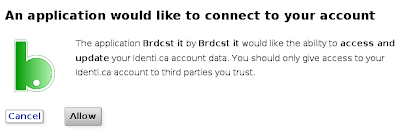
Click on Allow
8. Now go back to brdcst.it, this time click on Add/Edit beside feeds
9. In the first box add the address of your Diaspora feed that we noted in step 2. In the second box give this setup a name (I have imaginatively called it 'diaspora')

10. Now it's time to choose what you wish to export, for text only enter %s, if you want a link to be posted then add %u (you don't actually need this as it will be added automatically if your post exceeds the 140 character identi.ca limit)
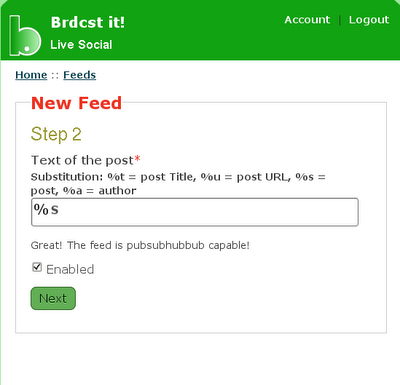
11. On the next screen, put a tick beside your identi.ca username and click on Save

12. Now log out of brdcst.it and your done, your posts from Diaspora will be updated on your identi.ca timeline.
Please note that when you post on Diaspora you must change from All Aspects to Public, only Public posts will be sent to identi.ca
In the spirit of this blog, I always try to keep everything open source, I'm going to link the accounts using brdcst.it a free, open source project by Michele Azzolari or @macno on identi.ca. Whilst brdcst.it is a free service; you need an invite, simply send an email to brdcst@brdcst.it
Once you have received your invitation log in to your new account at brdcst.it We'll do the destination first, trust me it's easier. I'll now break this into steps to make it easier to follow.
Before we can setup brdcst.it properly, we need the feed for your Diaspora posts.
1. On Diaspora, when you are about to make a post, you should see a text box similar to the one shown below:

Click on the spanner icon.
2. This will open up a new floating window, click on RSS, this will open up a new page. Take a note of the web page address.

In this example my address is https://joindiaspora/public/kevie.atom
*the recent rss feeds have .atom at the end
3. Go to the brdcst.it website.
4. On the welcome screen you'll see the number of feeds and destinations you currently have setup. Click on Add/Edit beside destinations, this will lead you to a new screen.
5. Click on Add new destination
6. Click on Identica
7. This will take you to identi.ca, log in (if necessary) and the site will display the message:

Click on Allow
8. Now go back to brdcst.it, this time click on Add/Edit beside feeds
9. In the first box add the address of your Diaspora feed that we noted in step 2. In the second box give this setup a name (I have imaginatively called it 'diaspora')

10. Now it's time to choose what you wish to export, for text only enter %s, if you want a link to be posted then add %u (you don't actually need this as it will be added automatically if your post exceeds the 140 character identi.ca limit)

11. On the next screen, put a tick beside your identi.ca username and click on Save

12. Now log out of brdcst.it and your done, your posts from Diaspora will be updated on your identi.ca timeline.
Please note that when you post on Diaspora you must change from All Aspects to Public, only Public posts will be sent to identi.ca
Diaspora is widely described as the open source version of facebook and google+, however it is disappointing that, using your Diaspora settings, you can link with facebook, twitter and tumblr but not identi.ca. But there is a workaround.
In the spirit of this blog, I always try to keep everything open source, I'm going to link the accounts using brdcst.it a free, open source project by Michele Azzolari or @macno on identi.ca. Whilst brdcst.it is a free service; you need an invite, simply send an email to brdcst@brdcst.it
Once you have received your invitation log in to your new account at brdcst.it We'll do the destination first, trust me it's easier. I'll now break this into steps to make it easier to follow.
Before we can setup brdcst.it properly, we need the feed for your Diaspora posts.
1. On Diaspora, when you are about to make a post, you should see a text box similar to the one shown below:

Click on the spanner icon.
2. This will open up a new floating window, click on RSS, this will open up a new page. Take a note of the web page address.

In this example my address is https://joindiaspora/public/kevie.atom
*the recent rss feeds have .atom at the end
3. Go to the brdcst.it website.
4. On the welcome screen you'll see the number of feeds and destinations you currently have setup. Click on Add/Edit beside destinations, this will lead you to a new screen.
5. Click on Add new destination
6. Click on Identica
7. This will take you to identi.ca, log in (if necessary) and the site will display the message:

Click on Allow
8. Now go back to brdcst.it, this time click on Add/Edit beside feeds
9. In the first box add the address of your Diaspora feed that we noted in step 2. In the second box give this setup a name (I have imaginatively called it 'diaspora')

10. Now it's time to choose what you wish to export, for text only enter %s, if you want a link to be posted then add %u (you don't actually need this as it will be added automatically if your post exceeds the 140 character identi.ca limit)

11. On the next screen, put a tick beside your identi.ca username and click on Save

12. Now log out of brdcst.it and your done, your posts from Diaspora will be updated on your identi.ca timeline.
Please note that when you post on Diaspora you must change from All Aspects to Public, only Public posts will be sent to identi.ca
In the spirit of this blog, I always try to keep everything open source, I'm going to link the accounts using brdcst.it a free, open source project by Michele Azzolari or @macno on identi.ca. Whilst brdcst.it is a free service; you need an invite, simply send an email to brdcst@brdcst.it
Once you have received your invitation log in to your new account at brdcst.it We'll do the destination first, trust me it's easier. I'll now break this into steps to make it easier to follow.
Before we can setup brdcst.it properly, we need the feed for your Diaspora posts.
1. On Diaspora, when you are about to make a post, you should see a text box similar to the one shown below:

Click on the spanner icon.
2. This will open up a new floating window, click on RSS, this will open up a new page. Take a note of the web page address.

In this example my address is https://joindiaspora/public/kevie.atom
*the recent rss feeds have .atom at the end
3. Go to the brdcst.it website.
4. On the welcome screen you'll see the number of feeds and destinations you currently have setup. Click on Add/Edit beside destinations, this will lead you to a new screen.
5. Click on Add new destination
6. Click on Identica
7. This will take you to identi.ca, log in (if necessary) and the site will display the message:

Click on Allow
8. Now go back to brdcst.it, this time click on Add/Edit beside feeds
9. In the first box add the address of your Diaspora feed that we noted in step 2. In the second box give this setup a name (I have imaginatively called it 'diaspora')

10. Now it's time to choose what you wish to export, for text only enter %s, if you want a link to be posted then add %u (you don't actually need this as it will be added automatically if your post exceeds the 140 character identi.ca limit)

11. On the next screen, put a tick beside your identi.ca username and click on Save

12. Now log out of brdcst.it and your done, your posts from Diaspora will be updated on your identi.ca timeline.
Please note that when you post on Diaspora you must change from All Aspects to Public, only Public posts will be sent to identi.ca
Updated: cross posting from Diaspora to identi.ca
Tuesday, 1 May 2012
Tizen 1.0 "Larkspur" is released.
Tizen, the Linux based mobile operating system that is replacing the short lived Meego project, is now out of beta and has announced it first full release codenamed "Larkspur".
In contrast to Mozilla's Boot2Gecko, which aims to use all of it's features on a cloud through a browser interface, Tizen adopts the more traditional format of the applications running natively on the mobile device.
The platform looks like it has been setup to meet the needs of the majority of users, with compatibility for various audio (both MP3 & Ogg Vorbis) and video files. A full list of all the features of the new release can be seen here.
Tizen's graphics are a window system built upon X11, this includes support for OpenGL and indicates that it has the potential for both 2D and 3D graphics. Web support appears to be embedded in the new code with full support for HTML5.
The official announcement from Tizen also stated " There are also a number of back-end changes, designed to improve stability and scalability of the infrastructure."
All of the pieces are there to make a decent cake, but developers are still being sought in order to put some icing on. The SDK is available for download, however at the present time the supported operating systems are limited to Windows XP & 7, Ubuntu 10.04-11.10 and only the 32 bit versions. SDK release notes, along with a wiki, bugtracker, IRC (#tizen at irc.freenode.net) and guide to help you developing your first Tizen application are currently in place in order to aid developers and testers.
In contrast to Mozilla's Boot2Gecko, which aims to use all of it's features on a cloud through a browser interface, Tizen adopts the more traditional format of the applications running natively on the mobile device.
The platform looks like it has been setup to meet the needs of the majority of users, with compatibility for various audio (both MP3 & Ogg Vorbis) and video files. A full list of all the features of the new release can be seen here.
Tizen's graphics are a window system built upon X11, this includes support for OpenGL and indicates that it has the potential for both 2D and 3D graphics. Web support appears to be embedded in the new code with full support for HTML5.
The official announcement from Tizen also stated " There are also a number of back-end changes, designed to improve stability and scalability of the infrastructure."
All of the pieces are there to make a decent cake, but developers are still being sought in order to put some icing on. The SDK is available for download, however at the present time the supported operating systems are limited to Windows XP & 7, Ubuntu 10.04-11.10 and only the 32 bit versions. SDK release notes, along with a wiki, bugtracker, IRC (#tizen at irc.freenode.net) and guide to help you developing your first Tizen application are currently in place in order to aid developers and testers.
Tizen, the Linux based mobile operating system that is replacing the short lived Meego project, is now out of beta and has announced it first full release codenamed "Larkspur".
In contrast to Mozilla's Boot2Gecko, which aims to use all of it's features on a cloud through a browser interface, Tizen adopts the more traditional format of the applications running natively on the mobile device.
The platform looks like it has been setup to meet the needs of the majority of users, with compatibility for various audio (both MP3 & Ogg Vorbis) and video files. A full list of all the features of the new release can be seen here.
Tizen's graphics are a window system built upon X11, this includes support for OpenGL and indicates that it has the potential for both 2D and 3D graphics. Web support appears to be embedded in the new code with full support for HTML5.
The official announcement from Tizen also stated " There are also a number of back-end changes, designed to improve stability and scalability of the infrastructure."
All of the pieces are there to make a decent cake, but developers are still being sought in order to put some icing on. The SDK is available for download, however at the present time the supported operating systems are limited to Windows XP & 7, Ubuntu 10.04-11.10 and only the 32 bit versions. SDK release notes, along with a wiki, bugtracker, IRC (#tizen at irc.freenode.net) and guide to help you developing your first Tizen application are currently in place in order to aid developers and testers.
In contrast to Mozilla's Boot2Gecko, which aims to use all of it's features on a cloud through a browser interface, Tizen adopts the more traditional format of the applications running natively on the mobile device.
The platform looks like it has been setup to meet the needs of the majority of users, with compatibility for various audio (both MP3 & Ogg Vorbis) and video files. A full list of all the features of the new release can be seen here.
Tizen's graphics are a window system built upon X11, this includes support for OpenGL and indicates that it has the potential for both 2D and 3D graphics. Web support appears to be embedded in the new code with full support for HTML5.
The official announcement from Tizen also stated " There are also a number of back-end changes, designed to improve stability and scalability of the infrastructure."
All of the pieces are there to make a decent cake, but developers are still being sought in order to put some icing on. The SDK is available for download, however at the present time the supported operating systems are limited to Windows XP & 7, Ubuntu 10.04-11.10 and only the 32 bit versions. SDK release notes, along with a wiki, bugtracker, IRC (#tizen at irc.freenode.net) and guide to help you developing your first Tizen application are currently in place in order to aid developers and testers.
Tizen 1.0 "Larkspur" is released.
Labels:
Linux,
meego,
mobile,
open source
Subscribe to:
Posts (Atom)


